Wednesday, 15 March 2017
Friday, 24 February 2017
EXPLANATION OF PUBLIC STATIC VOID MAIN(STRING[ ] AR)
// EXPLANATION OF PUBLIC STATIC VOID MAIN(STRING[ ] AR)
PUBLIC: The main method should be declared as public, so that the JVM can access the main method from any location.
STATIC: The main method should be declared as static, so that the JVM cam invoke the main method directly by using class name.
VOID: The caller of the main method is JVM and the JVM does not expect any value from the main method, therefore the main method should not return any value to JVM hence we specify the return type as void.
MAIN( ): main is the name of the method, a valid java identifier, following the java coding conventions and the name is fixed.
STRING[ ]: It is used for storing command line arguments.
The name of the string array can be any valid java identifier.
RULE: If a declaration contains multiple modifiers, then we can specify them in any sequence.
static public void main(String[ ] abc)
public static void main(String[ ] abc)
//EXPLAIN SYSTEM.OUT.PRINTLN( ):
Out is a reference variable declared as static in System class and therefore it can be accessed directly by using class name(System.out).
System.out will provide an object of PrintStream class. using which we can access the methods of PrintStream class and therefore we write System.out.println().
PUBLIC: The main method should be declared as public, so that the JVM can access the main method from any location.
STATIC: The main method should be declared as static, so that the JVM cam invoke the main method directly by using class name.
VOID: The caller of the main method is JVM and the JVM does not expect any value from the main method, therefore the main method should not return any value to JVM hence we specify the return type as void.
MAIN( ): main is the name of the method, a valid java identifier, following the java coding conventions and the name is fixed.
STRING[ ]: It is used for storing command line arguments.
The name of the string array can be any valid java identifier.
RULE: If a declaration contains multiple modifiers, then we can specify them in any sequence.
static public void main(String[ ] abc)
public static void main(String[ ] abc)
//EXPLAIN SYSTEM.OUT.PRINTLN( ):
- System is a predefined class available in java.lang package.
- Out is a reference variable of PrintStream class declared as static in System class.
- println() is predefined method available in PrintStream. PrintStream is a predefined class available in java.io package.
Out is a reference variable declared as static in System class and therefore it can be accessed directly by using class name(System.out).
System.out will provide an object of PrintStream class. using which we can access the methods of PrintStream class and therefore we write System.out.println().
Sunday, 19 February 2017
OPERATIONS ON ARRAYS USING METHOD INVOCATION TECHNIQUE
/** JAVA PROGRAM TO FIND SUM OF ARRAY ELEMENTS
TO FIND BIGGEST NUMBER OF ARRAY
TO FIND SMALLEST NUMBER OF ARRAY
USING METHOD INVOCATION */
class ArrayDemo3{
public static void main(String[] ar){
ArrayDemo3 ad= new ArrayDemo3();
int arr[]={10,201,3,44,5,66,7,568,94};
int s=ad.sum(arr);
System.out.println("sum of all array elements is:"+s);
ArrayDemo3 ad2= new ArrayDemo3();
int y=ad2.min(arr);
System.out.println("the min number of array is"+y);
ArrayDemo3 ad3= new ArrayDemo3();
int z=ad3.max(arr);
System.out.println("the max number if array is"+z);
}
int sum(int[] f){
int s=0;
for(int d:f){
s=s+d;
}
return s;
}
int min(int[] g){
int y=g[0];
for(int i=0;i<g.length;i++) {
if(y>g[i]){
y=g[i];
}
}
return y;
}
int max(int[] h){
int z=h[0];
for(int i=0;i<h.length;i++){
if(z<h[i]){
z=h[i];
}
}
return z;
}
}
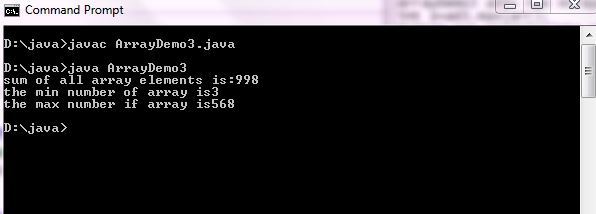
OUTPUT:
CLICK HERE FOR NORMAL PROCEDURE OF ARRAYS
TO FIND BIGGEST NUMBER OF ARRAY
TO FIND SMALLEST NUMBER OF ARRAY
USING METHOD INVOCATION */
class ArrayDemo3{
public static void main(String[] ar){
ArrayDemo3 ad= new ArrayDemo3();
int arr[]={10,201,3,44,5,66,7,568,94};
int s=ad.sum(arr);
System.out.println("sum of all array elements is:"+s);
ArrayDemo3 ad2= new ArrayDemo3();
int y=ad2.min(arr);
System.out.println("the min number of array is"+y);
ArrayDemo3 ad3= new ArrayDemo3();
int z=ad3.max(arr);
System.out.println("the max number if array is"+z);
}
int sum(int[] f){
int s=0;
for(int d:f){
s=s+d;
}
return s;
}
int min(int[] g){
int y=g[0];
for(int i=0;i<g.length;i++) {
if(y>g[i]){
y=g[i];
}
}
return y;
}
int max(int[] h){
int z=h[0];
for(int i=0;i<h.length;i++){
if(z<h[i]){
z=h[i];
}
}
return z;
}
}
OUTPUT:
CLICK HERE FOR NORMAL PROCEDURE OF ARRAYS
Friday, 17 February 2017
JAVA PROGRAM FOR ARITHMETIC OPERATIONS USING METHOD INVOCATION
// JAVA PROGRAM FOR ARITHMETIC OPERATIONS USING METHOD INVOCATION
import java.io.*;
class Calculations{
public static void main(String[] ar)
throws IOException{
BufferedReader br= new BufferedReader(new InputStreamReader(System.in));
System.out.println("enter your choice 1.add 2.sub 3. mul 4. div");
int ch= Integer.parseInt(br.readLine());
switch(ch){
case 1: Calculations ad= new Calculations();
ad.add();
break;
case 2: System.out.println("enter x value:");
int x= Integer.parseInt(br.readLine());
System.out.println("enter y value:");
int y= Integer.parseInt(br.readLine());
Calculations sb= new Calculations();
sb.sub(x,y);
break;
case 3: Calculations mu= new Calculations();
int res= mu.mul();
System.out.println("the multiplication of given numbers is:"+res);
break;
case 4: Calculations di= new Calculations();
System.out.println("enter a value:");
int a= Integer.parseInt(br.readLine());
System.out.println("enter b value:");
int b= Integer.parseInt(br.readLine());
int result= di.div(a,b);
System.out.println("the division of given numbers is:"+result);
break;
default: System.out.println("choose correct option");
}
}
void add()
throws IOException{
BufferedReader br= new BufferedReader(new InputStreamReader(System.in));
System.out.println("enter x value:");
int x= Integer.parseInt(br.readLine());
System.out.println("enter y value:");
int y= Integer.parseInt(br.readLine());
int z=x+y;
System.out.println("sum of"+x+"and"+y+"is:"+z);
}
void sub(int m,int n)
throws IOException{
BufferedReader br= new BufferedReader(new InputStreamReader(System.in));
int z=m-n;
System.out.println("sub:"+z);
}
int mul()
throws IOException{
BufferedReader br= new BufferedReader(new InputStreamReader(System.in));
System.out.println("enter x value:");
int x= Integer.parseInt(br.readLine());
System.out.println("enter y value:");
int y= Integer.parseInt(br.readLine());
int z=x*y;
return z;
}
int div(int m,int n)
throws IOException{
BufferedReader br= new BufferedReader(new InputStreamReader(System.in));
int z= m/n;
return z;
}
}
OUTPUT:
import java.io.*;
class Calculations{
public static void main(String[] ar)
throws IOException{
BufferedReader br= new BufferedReader(new InputStreamReader(System.in));
System.out.println("enter your choice 1.add 2.sub 3. mul 4. div");
int ch= Integer.parseInt(br.readLine());
switch(ch){
case 1: Calculations ad= new Calculations();
ad.add();
break;
case 2: System.out.println("enter x value:");
int x= Integer.parseInt(br.readLine());
System.out.println("enter y value:");
int y= Integer.parseInt(br.readLine());
Calculations sb= new Calculations();
sb.sub(x,y);
break;
case 3: Calculations mu= new Calculations();
int res= mu.mul();
System.out.println("the multiplication of given numbers is:"+res);
break;
case 4: Calculations di= new Calculations();
System.out.println("enter a value:");
int a= Integer.parseInt(br.readLine());
System.out.println("enter b value:");
int b= Integer.parseInt(br.readLine());
int result= di.div(a,b);
System.out.println("the division of given numbers is:"+result);
break;
default: System.out.println("choose correct option");
}
}
void add()
throws IOException{
BufferedReader br= new BufferedReader(new InputStreamReader(System.in));
System.out.println("enter x value:");
int x= Integer.parseInt(br.readLine());
System.out.println("enter y value:");
int y= Integer.parseInt(br.readLine());
int z=x+y;
System.out.println("sum of"+x+"and"+y+"is:"+z);
}
void sub(int m,int n)
throws IOException{
BufferedReader br= new BufferedReader(new InputStreamReader(System.in));
int z=m-n;
System.out.println("sub:"+z);
}
int mul()
throws IOException{
BufferedReader br= new BufferedReader(new InputStreamReader(System.in));
System.out.println("enter x value:");
int x= Integer.parseInt(br.readLine());
System.out.println("enter y value:");
int y= Integer.parseInt(br.readLine());
int z=x*y;
return z;
}
int div(int m,int n)
throws IOException{
BufferedReader br= new BufferedReader(new InputStreamReader(System.in));
int z= m/n;
return z;
}
}
OUTPUT:
Sunday, 12 February 2017
JAVA PROGRAM USING ENCAPSULATION TECHNIQUE
// JAVA PROGRAM USING ENCAPSULATION TECHNIQUE
class Student{
int rollno;
double marks;
String name;
void display(){
System.out.println("rollno:"+ rollno);
System.out.println("marks:"+ marks);
System.out.println("name:"+ name);
}
public static void main(String[] ar){
System.out.println("student information");
Student st=new Student();
st.display();
}
}
class Student{
int rollno;
double marks;
String name;
void display(){
System.out.println("rollno:"+ rollno);
System.out.println("marks:"+ marks);
System.out.println("name:"+ name);
}
public static void main(String[] ar){
System.out.println("student information");
Student st=new Student();
st.display();
}
}
OUTPUT;
rollno:0
marks:0.0
name:null
when the above java program Student.java is compiled, the compiler will verify whether the java code available in the program is valid or not, if valid the compiler will generate the .class file. The .class file generated by the compiler will be provided to the JVM for execution.
The execution of the java program will be done by the JVM and it begins from the main(). Initially the java stack will be empty. the JVM will begin execution of the program by calling main(). When a method is called for execution then that method will be pushed into the java stack and then begins the execution.
Student st= new Student();
The above statement will create an object of Student class. Creating an object means allocating memory for the instance variables in heap memory.
A class can contain any number of methods, but the JVM can call only main() for execution. If we want other methods to be executed, then it is the responsibility of the programmer to call the other method which has to be executed.
st.display();
The above statement will call display() for execution. When the display() is called for execution, the display() will be pushed into the java stack and then begins the execution. When a method is completely executed then that method will be popped(removed) from the java stack.
TO KNOW ABOUT OOPS CONCEPTS CHECK HERE........
rollno:0
marks:0.0
name:null
when the above java program Student.java is compiled, the compiler will verify whether the java code available in the program is valid or not, if valid the compiler will generate the .class file. The .class file generated by the compiler will be provided to the JVM for execution.
The execution of the java program will be done by the JVM and it begins from the main(). Initially the java stack will be empty. the JVM will begin execution of the program by calling main(). When a method is called for execution then that method will be pushed into the java stack and then begins the execution.
Student st= new Student();
The above statement will create an object of Student class. Creating an object means allocating memory for the instance variables in heap memory.
A class can contain any number of methods, but the JVM can call only main() for execution. If we want other methods to be executed, then it is the responsibility of the programmer to call the other method which has to be executed.
st.display();
The above statement will call display() for execution. When the display() is called for execution, the display() will be pushed into the java stack and then begins the execution. When a method is completely executed then that method will be popped(removed) from the java stack.
TO KNOW ABOUT OOPS CONCEPTS CHECK HERE........
Thursday, 9 February 2017
JAVA PROGRAM TO CHECK ARMSTRONG NUMBER
/* JAVA PROGRAM TO CHECK ARMSTRONG NUMBER
ENTERED FROM KEYBOARD */
import java.io.*;
class ArmstrongNumber{
public static void main(String[] ar)
throws IOException{
BufferedReader br= new BufferedReader(
new InputStreamReader(System.in));
System.out.print("enter the number to check armstrong number:");
int n=Integer.parseInt(br.readLine());
int a=0,k=0,temp;
temp=n;
while(n>0){
a=n%10;
n=n/10;
k=k+(a*a*a);
}
if(temp==k){
System.out.println("the number is armstrong number");
}
else{
System.out.println("the number is not armstrong number");
}
}
}
OUTPUT:
ENTERED FROM KEYBOARD */
import java.io.*;
class ArmstrongNumber{
public static void main(String[] ar)
throws IOException{
BufferedReader br= new BufferedReader(
new InputStreamReader(System.in));
System.out.print("enter the number to check armstrong number:");
int n=Integer.parseInt(br.readLine());
int a=0,k=0,temp;
temp=n;
while(n>0){
a=n%10;
n=n/10;
k=k+(a*a*a);
}
if(temp==k){
System.out.println("the number is armstrong number");
}
else{
System.out.println("the number is not armstrong number");
}
}
}
OUTPUT:
Tuesday, 7 February 2017
OPERATIONS ON STRINGS
// OPERATIONS ON STRINGS
class StringDemo2{
public static void main(String[] args){
String str=new String("hello");
System.out.println(str+1+2+3);
System.out.println(1+str+2+3);
System.out.println(1+2+str+3);
System.out.println(1+2+3+str);
}
}
Out put:
hello123
1hello23
3hello3
6hello
class StringDemo2{
public static void main(String[] args){
String str=new String("hello");
System.out.println(str+1+2+3);
System.out.println(1+str+2+3);
System.out.println(1+2+str+3);
System.out.println(1+2+3+str);
}
}
Out put:
hello123
1hello23
3hello3
6hello
Subscribe to:
Posts (Atom)